Anchor: A Nautical Font for Creative Designers
More Than Just a Symbol: The Power of a Thematic Typeface
Imagine transforming a simple invitation or a brand logo with a single, powerful visual element that instantly communicates a theme. This is the promise of Anchor, a playful dingbat font that translates the iconic symbol of maritime strength into a versatile design asset. In an era where visual communication must be immediate and evocative, such specialized typographic resources are invaluable for graphic designers seeking to inject personality and clarity into their work.
Understanding the Anchor Typeface
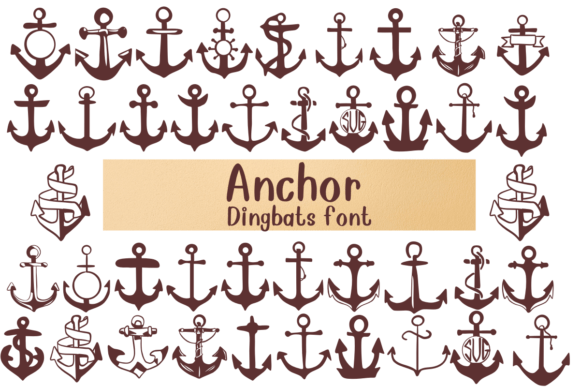
Unlike traditional fonts composed of letters and numbers, Anchor is a dingbat font, meaning each character maps to a unique illustration—in this case, a different style of anchor. This collection ranges from classic, robust designs to whimsical, decorative interpretations. For a designer, this provides a curated library of vector-ready symbols, eliminating the need to source or draw individual icons. The font format ensures scalability, color adaptability, and seamless integration into any design software, streamlining the creative workflow.
Practical Applications Across Design Disciplines
The utility of a theme-specific font like Anchor extends far beyond nautical projects. Its strength lies in its ability to reinforce a visual narrative quickly. Consider these practical applications:
- Branding and Logo Design: Integrate a stylized anchor into logos for seafood restaurants, sailing clubs, adventure brands, or coastal retreats to build immediate thematic recognition.
- Marketing Materials: Use anchor motifs as decorative elements in brochures, flyers, and posters for summer sales, travel promotions, or waterfront events to enhance visual appeal and contextual relevance.
- Social Media Graphics: Create eye-catching posts and stories for Instagram or Pinterest. An anchor icon can serve as a branded hashtag marker or a consistent visual element in a content series.
- Website and UI Design: Employ anchor characters as custom icons in user interfaces, loading animations, or as decorative dividers to enrich the user experience with subtle thematic detail.
- Packaging and Print Design: Elevate product packaging for gourmet foods, artisanal goods, or merchandise with stamped or embossed anchor designs, adding a tactile and visual premium feel.
- Editorial and Presentation Design: Break up text-heavy layouts in magazines, reports, or slide decks with thematic illustrations that maintain visual hierarchy and reader engagement.
Integrating Thematic Assets Effectively
Successfully incorporating a font like Anchor requires thoughtful application. Always consider your project's core message and audience. A bold, traditional anchor conveys stability and tradition, perfect for financial or heritage brands. A more fluid, artistic design suits creative or lifestyle contexts.
Maintain visual harmony by pairing the anchor symbols with complementary typography and a cohesive color palette. Ensure the symbol's scale supports the overall composition—it should accent, not overwhelm. For digital projects, test readability across devices. In print, consider how the design translates to different finishes and materials. The goal is to create a seamless visual experience where every element, including decorative typography, feels intentional and contributes to the brand identity.
Choosing Quality Creative Assets
When selecting any design asset, evaluate its versatility, technical quality, and licensing. A well-crafted font like Anchor offers multiple styles, ensuring you have options for different contexts. Check that the file formats are compatible with your design software and that the licensing permits your intended use, whether for commercial or personal projects.
Thoughtful design is about making deliberate choices that enhance communication. By integrating specialized, high-quality assets like the Anchor font, designers can efficiently produce polished, professional work that resonates with audiences. It demonstrates an attention to detail that elevates the entire project, turning a good design into a memorable one that effectively bridges the gap between concept and viewer.